
E-commerce,

Product page: five elements that turn visitors into buyers

The product page does most of the selling in your store. Here is what decides whether it sells, based on more than 200 A/B tests.
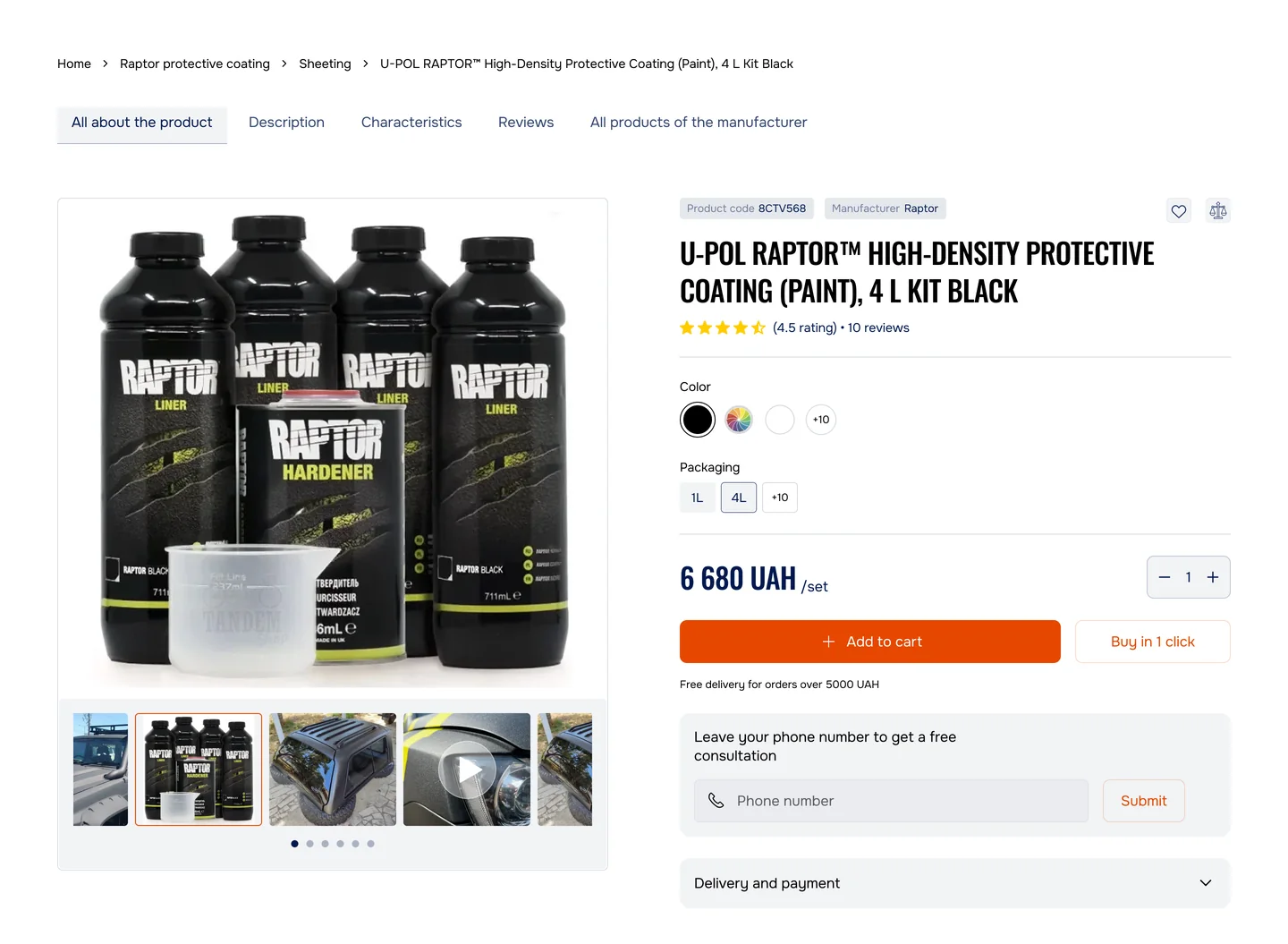
TandemShop product page after the DizArm redesign: a Raptor protective coating kit with colour and pack size choice, the price, Add to cart and Buy in 1 click.
Author
DizArm UX team
Read
12 min
Date
Type
E-commerce, CRO

Same problem?

Send us a link to one product page. We reply with the three things we would fix first.

Send numbers

Most people who open a product page leave it without doing anything. This is how shoppers treat an average one:

leave for a competitor without a single action
40%
average time on the page, 3 s if not interested
23 s
bounce rate, industry average
45–60%
decide to buy or not in the first 10 seconds
73%

The good part: a well-built product page turns these numbers into sales. We tested more than 200 product pages in footwear, furniture, auto, sportswear and electronics, and the same five elements kept deciding conversion. Done well, they lift it by 15–35%. Done badly, they cut it by 20–40%.

Element 01

Product photos

Of the five, this one moves conversion the most.

The photo is the first contact with the product. 65% of people rely on photos more than on the description. With one photo, 34% of users click “buy”; with several, 58%. Photos of real people wearing the product convert 40% better than studio shots.

1. Show at least 6–8 photos

  • 1–2 main shots on a neutral background
  • 2–3 shots from different angles
  • 2–3 photos of people wearing the product: your buyers, or borrowed from Instagram
  • 1 close-up of the material, seams and texture
Weak: 4 photos, all studio
A sample product page with one large studio photo of a white sneaker and four thumbnails, 1 of 4.
Strong: 8 photos: angles, people, detail
The same page with eight thumbnails: studio, angles, the sneaker on people and a close-up of the mesh.
Illustration on Stride, a mock store. The same shoe; the strong page adds the sole, people wearing it and a close-up of the mesh.

Test result

4 photos: 2.1% conversion to 8 photos: 2.9%

+38%

2. Let people turn the product: 360° view or a slider

A static image answers one question. Let shoppers turn the product before they buy: on mobile this cuts returns by 15–20%.

Tools

  • Shopify: Spline, GLightbox
  • WooCommerce: Product 360 Viewer
  • Custom build: Babylon.js, Three.js
Weak: One static image
One static photo of the sneaker and nothing else.
Strong: Arrows, 360° and position
The sneaker photo with left and right arrows, a “360° · drag to turn” control and a position indicator.
The strong page shows that there is more to see: arrows, a 360° control and a position indicator.

3. A clean background, nothing else in the frame

Weak: a messy shot on a grey surface with fifty other things in it. Strong: a clean white background with only the product in focus. Studio shoots are expensive; AI generation can cover them, or ask us and skip the costly mistakes.

Weak: Clutter around the product
White sneakers on a carpet among shoes, clothes and a chair.
Strong: Product alone, white background
The white sneaker alone on a white background.
Stock photos used for illustration. On a real page both would be shots of your own product.

4. Photos on real people convert best

  • Ask buyers for their photos in Instagram DMs
  • Order posts from micro-bloggers with 3,000+ followers: a smaller audience means closer contact and more trust
  • Send a gift set to customers who buy from you every month and ask them to film their reaction. It brings traffic and new orders
Weak: Studio shots only
A gallery of six studio shots of the sneaker.
Strong: Studio plus photos from buyers
A studio shot followed by “Photos from buyers, 24”: three buyers wearing the sneaker, signed Olena, Kyiv; Taras, Lviv; Ihor, Dnipro.
Real people in the frame answer “what will it look like on me?”. Names on the mock are placeholders.

Test result

Studio only: 2.1% to studio + 2–3 photos from buyers: 2.75%

+31%

Why it works: people see “that’s exactly what I’m buying”, and doubt drops by half.

5. Zoom for the details

Allow zoom up to 200–300%. Buyers want to see the seams, the material and the quality. Shopify has it by default; WooCommerce needs a plugin.

Weak: Small image, no zoom
A small product photo with no zoom.
Strong: Zoom to 250% on hover
A round lens over the sneaker showing the mesh at 250%.
The lens shows the mesh at 250%, the level where seams and weave become visible.

Element 02

Product description

The photo answers “what is it?”. The description answers “is it right for me?”.

A thin description leaves doubts, and doubts keep conversion low. A description that sells has six parts.

1. Short description: the first 2–3 lines

Weak: Specs instead of an answer
Product card for Stride Run 2, $79, rated 4.8, with the line “Running sneakers. EU size. White.” above Add to cart.
Strong: Who it is for and what it solves
The same card with “Light running shoes that don’t tire your feet. Cushioning plus breathable mesh. Tested on 10 km races. Suitable for flat feet.”
The first lines are the only part most people read. The strong version answers who the shoe is for and what problem it solves.

2. Key benefits: 3–5 points

Name the feature, then say what it gives the buyer. A spec on its own makes people do the translation themselves.

Weak: Features only
A “Details” list: weight 200 g, upper mesh, midsole ENERGY FOAM™, mileage 500 km.
Strong: Each feature with what it gives
“Why runners pick it”: only 200 g a pair, lighter than competitors; breathable mesh, your feet don’t sweat; ENERGY FOAM™ cushioning, comfortable all day; 500+ km without wearing out, saves money; for runners doing 5–10 km and people who walk a lot.

Test result

Short description: 2.28% to description with benefits: 2.71%

+19%

3. Materials and construction

People want to know what they get for a price that may be higher than a similar product elsewhere. Details build trust.

Strong: Materials as a short table
“Materials and construction” table: upper, synthetic mesh 50% + microfibre 50%; insole, orthopaedic foam, removable; sole, rubber, lasts 500 km; weight, 200 g a pair; made in Vietnam.

4. Size chart: critical

Add a chart and one line of advice: “between sizes, choose the larger one”. Few photos plus no size chart is half of all returns.

Weak: A dropdown and nothing else
A “Select size” dropdown above Add to cart.
Strong: Chart plus advice
Size buttons 37 to 41 with a chart of European, US and centimetre sizes and the note “Between sizes? Choose the larger one.”

Returns

Without a size chart: 3.2% of orders returned to with one: 1.8%

−44%

5. Care instructions

People want a product that lasts. Correct care keeps it in shape for longer, and saying so shows you expect it to last.

Strong: How to care, and what not to do
“Care” table: washing, warm water and a soft brush every 2 weeks; drying, at room temperature, never on a radiator; storage, in a dry place away from moisture; don’t, machine wash or tumble dry.

6. What buyers say

Close the description with at least three short quotes from buyers. How to pick and show them is in element 04.

Checklist for your description

  • The first 2 lines answer “who is it for?”
  • 3–5 key benefits
  • Materials and construction described
  • A size chart plus advice
  • Care instructions
  • Social proof, at least 3 quotes
  • Everything clear to a non-expert
  • No jargon, or jargon explained

Element 03

Price and delivery

The most common reason people buy, and the most common reason they leave.

25% of people close the page when they see the delivery cost. 41% want to know it before they reach checkout. An unclear price makes 30% of users leave.

1. The price stays in view while scrolling

Weak: the price sits at the top and disappears as soon as the buyer scrolls. Strong: the add-to-cart block sticks to the screen, so price, size, quantity and the button are always in view.

Weak: Scrolled down: no price, no button
A page scrolled to the description and reviews, with no price or button in view.
Strong: Price, size and button stay on top
The same scrolled page with a bar on top: Stride Run 2, $79, EU 39, 1 pc and Add to cart.
Both screens are scrolled to the reviews. On the weak page the buyer has to go back up to act.

2. Show delivery before checkout

Weak: Delivery appears only at checkout
Stride Run 2, $79, Add to cart and the note “Shipping calculated at checkout”.
Strong: Every option with price and time
Three delivery options with price and time before Add to cart: Nova Poshta, 2–3 days, +$5; Ukrposhta, 5–7 days, +$3; pickup in store, 1 day, free.
The strong page shows the real total before anyone clicks, so nobody meets a surprise at checkout.
Our project: TandemShop, after the redesign
TandemShop product page after the redesign: colour and pack size, the price 6 680 UAH, Add to cart, Buy in 1 click and “Free delivery for orders over 5000 UAH” under the price.
What it shows
  • Price, colour and pack size in one block
  • “Buy in 1 click” next to add-to-cart
  • “Free delivery for orders over 5000 UAH” right under the price
Delivery terms stand where the price is read, not in the cart.

Buyers see the real price at once and don’t drop off at checkout.

3. Show the saving, if there is one

Weak: Just a number
Stride Run 2 with the price $79 and nothing else.
Strong: Old price, new price, the difference
Stride Run 2 with the old price $99 crossed out, $79, a −20% badge and “You save $20”.

People buy the saving, not only the product.

4. Free delivery from a set amount

Say it on the page: free delivery from $100. With a $79 item in the cart, the buyer needs $21 more and adds a second product to get there. The average order grows.

Weak: Delivery cost, no way to avoid it
A mock cart: Stride Run 2, $79, delivery $5, total $84 and Checkout.
Our project: TandemShop cart, mobile
TandemShop mobile cart in Ukrainian: a promo code field, the total 4 190 UAH and the line “add 810 UAH more for free delivery” above the checkout button.
The mock cart shows only the delivery cost. TandemShop, our project, says under the total: “Add 810 UAH more for free delivery”, so the buyer sees how far the threshold is.

5. Show what’s in the box

People need to understand exactly what they are paying for.

Strong: The box, listed
A photo of the box with the list “In the box”: sneakers, 1 pair; warm insoles; dust bag; care guide; 1-year warranty, exchange if defective.

Element 04

Social proof

People don’t trust a store they don’t know.

72% of people trust ratings more than advertising. One visible negative review cuts conversion by 30%. And a 4.8 out of 5 converts better than a perfect 5.0: a flawless score looks suspicious.

1. Product rating

Weak: A perfect score from three people
Stride Run 2 rated 5.0 from 3 reviews.
Strong: 4.8 from 342 buyers
Stride Run 2 rated 4.8 out of 5 from 342 reviews, with “342 people bought this and recommend it”.
The number of reviews is what makes a rating believable.

2. Written reviews: show the top 3

  • Show the buyer’s city: people trust locals
  • Show “Verified purchase”: these are real buyers
  • Show the name, even just a first name
Weak: Anonymous one-word reviews
Three reviews: “Great!”, “Good” and “OK”, signed Anonymous and Guest.
Strong: Name, city, verified
Three reviews with name, city and a Verified purchase mark, including a four-star one: “A bit big, but the exchange was easy. Thank you!”
A four-star review with an honest note reads as real and answers a question about size at the same time.

Test result

No reviews: 2.08% to 3–5 reviews: 2.62%

+26%

3. Photos and videos from buyers

A “Your photos” gallery of real people wearing the product, and links to buyers’ TikTok and YouTube videos. Where to get them: ask in the post-purchase email, search #yourstore on Instagram, or write in the description “Share your photo and get 5% off your next order”.

Strong: A gallery from buyers
“Your photos, 27”: buyer photos with +23 more, links to a TikTok video and a YouTube video, and “Share your photo and get 5% off your next order”.
Buyer photos double as the UGC from element 01, only here they sit next to the reviews.

4. “N people bought this”

“42 people bought this in the last 7 days.” Others are buying it, so it’s popular, so I should buy it too.

Weak: No sign anyone buys it
Stride Run 2, $79 and Add to cart.
Strong: Recent purchases next to the price
Stride Run 2, $79, “42 people bought this in the last 7 days” and Add to cart.
Show a real counter only. A made-up number is found out quickly and costs more trust than it earns.

5. Guarantees

People hesitate less when they know they can send it back.

Strong: Promises under the button
Under Add to cart: 30-day returns, no questions asked; 1-year quality warranty; free return delivery.

Element 05

The add-to-cart button

The last step before the sale.

The wrong button and people don’t buy. Five things decide whether it gets pressed.

1. Size: at least 50 × 50 px

On mobile the button should take at least 60% of the screen width, so it can be hit with a thumb.

Weak: Small, hard to hit
A phone screen with a small “Add” button next to the price.
Strong: Full width, 52 px tall
The same screen with a full-width Add to cart button.

2. A contrasting colour

Weak: a grey button on a grey background, easy to miss. Strong: a red or orange button on white, visible at once.

Weak: Grey on grey
A grey Add to cart button on a grey card.
Strong: Orange on white
An orange Add to cart button on a white card.

Test result

A grey button to an orange one

+5–10%

3. Button text

“Buy” is vague. “Add to cart” names the action. “Add to cart — $79” also shows what it costs.

Weak: Buy
An orange button that says “Buy”.
Strong: Add to cart
An orange button that says “Add to cart”.
Strong: Better: with the price
An orange button that says “Add to cart — $79”.

4. The button follows the scroll

When the buyer scrolls down into the description, the button sticks to the bottom of the screen. Nobody should have to scroll back up to add to cart.

Weak: Scrolled down, button gone
A phone screen scrolled to the description and reviews, with no button in view.
Strong: Button stuck to the bottom
The same screen with “Add to cart — $79” stuck to the bottom.

5. A second action for those not ready to buy

  • Let them save it: an email gives you a list
  • Let them ask: a chat gives you a contact
Weak: Buy now or leave
Stride Run 2, $79 and a single Add to cart button.
Strong: Save it or ask first
Stride Run 2, $79, Add to cart and two more buttons: Save for later and Ask a question.

Bonus

Checklist for your product page

Go through it on one product page. Every unticked line is a place where buyers drop off.

Photos

  • At least 6–8 photos
  • 3+ photos of people wearing the product
  • A 360° view or a slider
  • Details visible: seams, material, texture
  • Zoom up to 200%

Description

  • The first 2 lines answer “who is it for?”
  • 3–5 benefits, not features
  • Materials and construction
  • A size chart plus advice
  • Care instructions
  • 3–5 real reviews

Price and delivery

  • The price stays in view while scrolling
  • Delivery shown before checkout
  • Delivery options with their prices
  • Free delivery from a set amount, if possible
  • What’s in the box

Social proof

  • The rating is visible
  • 3–5 top reviews with a photo or a name
  • A “Verified purchase” mark
  • Photos and videos from buyers
  • “42 people bought this week”
  • Guarantees in view

Add-to-cart button

  • At least 50 × 50 px
  • A colour that contrasts with the background
  • Text: “Add to cart”
  • Sticks while scrolling
  • A second action: “Save for later” or “Ask a question”

Results

How much conversion grows

Typical results from our tests, starting from the same 2.1% conversion.

Scenario Before After Lift
1. Photos, with buyer photos 2.1% 2.75% +31%
2. Photos + description 2.1% 2.85% +35%
3. Photos + description + delivery 2.1% 2.95% +40%
4. All five elements 2.1% 2.75%Average order $67 → $73. The lift here is revenue per month, not conversion. +28%

Same problem?

Send us a link to one product page. We reply with the three things we would fix first.

Send numbers

Our project: TandemShop

The same five elements on a real store

Before
The old TandemShop product page: a product photo, a long title, a colour grid, the price and one orange button, with no pack choice and no delivery terms.
After
The redesigned TandemShop product page with three markers: 1, colour and pack size on the card; 2, Buy in 1 click next to Add to cart; 3, free delivery for orders over 5000 UAH under the price.

Before: a gallery, a title, a price and one button, with no pack or colour choice and no delivery terms. After: colour and pack size on the card, “buy in 1 click” next to add-to-cart, and “free delivery for orders over 5000 UAH” right under the price.

I would be happy to provide additional information about the solutions developed by our team and assist you in selecting the optimal approach.

Khrystyna Didukh Business Manager

Summary

The product page is the biggest sales engine a store has. Getting these five elements right gives you:

  1. More photos: people trust what they see
  2. A detailed description: fewer returns
  3. A clear price and delivery: fewer drop-offs at checkout
  4. Social proof: people buy what others buy
  5. The right button: easier to press
cost of the work, depending on the platform
$1,000–5,000
conversion
+20–40%
return over 6–12 months
800–2000%

CRO audit for your store

See where your product page loses buyers

Conversion below 2%, marketing that has hit its ceiling, or people who buy once and never come back? We audit your product page and show where conversion can grow by 20–40% in your niche over the next 90 days.

Thank you, your request is in. We will reply by email.
The request didn't go through. Try again, or write to hello.dizarm@gmail.com.
  • Reply within one working day
  • An honest no if it's not a match

5.0 on Clutch · 15 reviews All fifteen are five-star

ClipSwift · DEOZEN · Tandem · PickUpShoes

Clients we can name

  • Clutch
  • Upwork Top Rated
  • GoodFirms
  • DesignRush

Clutch Special Kudos 2024 · 2025 · 2026

Review

5.0

1111111DizArm UX/UI Agency's work improved user retention and navigation, increased brand recognition, and the client's professional presence in the market. Moreover...

Bohdan Lyshchenko

Founder at ClipSwift

5.0

DizArm UX/UI Agency's work improved user retention and navigation, increased brand recognition, and the client's professional presence in the market. Moreover...

Bohdan Lyshchenko

Founder at ClipSwift

5.0

DizArm UX/UI Agency's work improved user retention and navigation, increased brand recognition, and the client's professional presence in the market. Moreover...

Bohdan Lyshchenko

Founder at ClipSwift

5.0

DizArm UX/UI Agency's work improved user retention and navigation, increased brand recognition, and the client's professional presence in the market. Moreover...

Bohdan Lyshchenko

Founder at ClipSwift

5.0

DizArm UX/UI Agency's work improved user retention and navigation, increased brand recognition, and the client's professional presence in the market. Moreover...

Bohdan Lyshchenko

Founder at ClipSwift

The first step is always a conversation

Fill out the form today and get a response within 1 hour. If we miss that window, you'll receive a complimentary product audit or concept development from DizArm.

0/5000
Budget* (Optional)
0/5000
Thank you! Your submission has been received!
Oops! Something went wrong while submitting the form.

I would be happy to provide additional information about the solutions developed by our team and assist you in selecting the optimal approach.

Bohdan Lyshchenko
[ CEO ] DizArm.Creative
hello.dizarm@gmail.com