


E-commerce,
Product page: five elements that turn visitors into buyers
The product page does most of the selling in your store. Here is what decides whether it sells, based on more than 200 A/B tests.
Same problem?
Send us a link to one product page. We reply with the three things we would fix first.
Send numbersMost people who open a product page leave it without doing anything. This is how shoppers treat an average one:
- leave for a competitor without a single action
- 40%
- average time on the page, 3 s if not interested
- 23 s
- bounce rate, industry average
- 45–60%
- decide to buy or not in the first 10 seconds
- 73%
The good part: a well-built product page turns these numbers into sales. We tested more than 200 product pages in footwear, furniture, auto, sportswear and electronics, and the same five elements kept deciding conversion. Done well, they lift it by 15–35%. Done badly, they cut it by 20–40%.
Element 01
Product photos
Of the five, this one moves conversion the most.
The photo is the first contact with the product. 65% of people rely on photos more than on the description. With one photo, 34% of users click “buy”; with several, 58%. Photos of real people wearing the product convert 40% better than studio shots.
1. Show at least 6–8 photos
- 1–2 main shots on a neutral background
- 2–3 shots from different angles
- 2–3 photos of people wearing the product: your buyers, or borrowed from Instagram
- 1 close-up of the material, seams and texture


Test result
4 photos: 2.1% conversion to 8 photos: 2.9%
+38%
2. Let people turn the product: 360° view or a slider
A static image answers one question. Let shoppers turn the product before they buy: on mobile this cuts returns by 15–20%.
Tools
- Shopify: Spline, GLightbox
- WooCommerce: Product 360 Viewer
- Custom build: Babylon.js, Three.js


3. A clean background, nothing else in the frame
Weak: a messy shot on a grey surface with fifty other things in it. Strong: a clean white background with only the product in focus. Studio shoots are expensive; AI generation can cover them, or ask us and skip the costly mistakes.


4. Photos on real people convert best
- Ask buyers for their photos in Instagram DMs
- Order posts from micro-bloggers with 3,000+ followers: a smaller audience means closer contact and more trust
- Send a gift set to customers who buy from you every month and ask them to film their reaction. It brings traffic and new orders


Test result
Studio only: 2.1% to studio + 2–3 photos from buyers: 2.75%
+31%
Why it works: people see “that’s exactly what I’m buying”, and doubt drops by half.
5. Zoom for the details
Allow zoom up to 200–300%. Buyers want to see the seams, the material and the quality. Shopify has it by default; WooCommerce needs a plugin.


Element 02
Product description
The photo answers “what is it?”. The description answers “is it right for me?”.
A thin description leaves doubts, and doubts keep conversion low. A description that sells has six parts.
1. Short description: the first 2–3 lines


2. Key benefits: 3–5 points
Name the feature, then say what it gives the buyer. A spec on its own makes people do the translation themselves.


Test result
Short description: 2.28% to description with benefits: 2.71%
+19%
3. Materials and construction
People want to know what they get for a price that may be higher than a similar product elsewhere. Details build trust.

4. Size chart: critical
Add a chart and one line of advice: “between sizes, choose the larger one”. Few photos plus no size chart is half of all returns.


Returns
Without a size chart: 3.2% of orders returned to with one: 1.8%
−44%
5. Care instructions
People want a product that lasts. Correct care keeps it in shape for longer, and saying so shows you expect it to last.

6. What buyers say
Close the description with at least three short quotes from buyers. How to pick and show them is in element 04.
Checklist for your description
- The first 2 lines answer “who is it for?”
- 3–5 key benefits
- Materials and construction described
- A size chart plus advice
- Care instructions
- Social proof, at least 3 quotes
- Everything clear to a non-expert
- No jargon, or jargon explained
Element 03
Price and delivery
The most common reason people buy, and the most common reason they leave.
25% of people close the page when they see the delivery cost. 41% want to know it before they reach checkout. An unclear price makes 30% of users leave.
1. The price stays in view while scrolling
Weak: the price sits at the top and disappears as soon as the buyer scrolls. Strong: the add-to-cart block sticks to the screen, so price, size, quantity and the button are always in view.


2. Show delivery before checkout


- Price, colour and pack size in one block
- “Buy in 1 click” next to add-to-cart
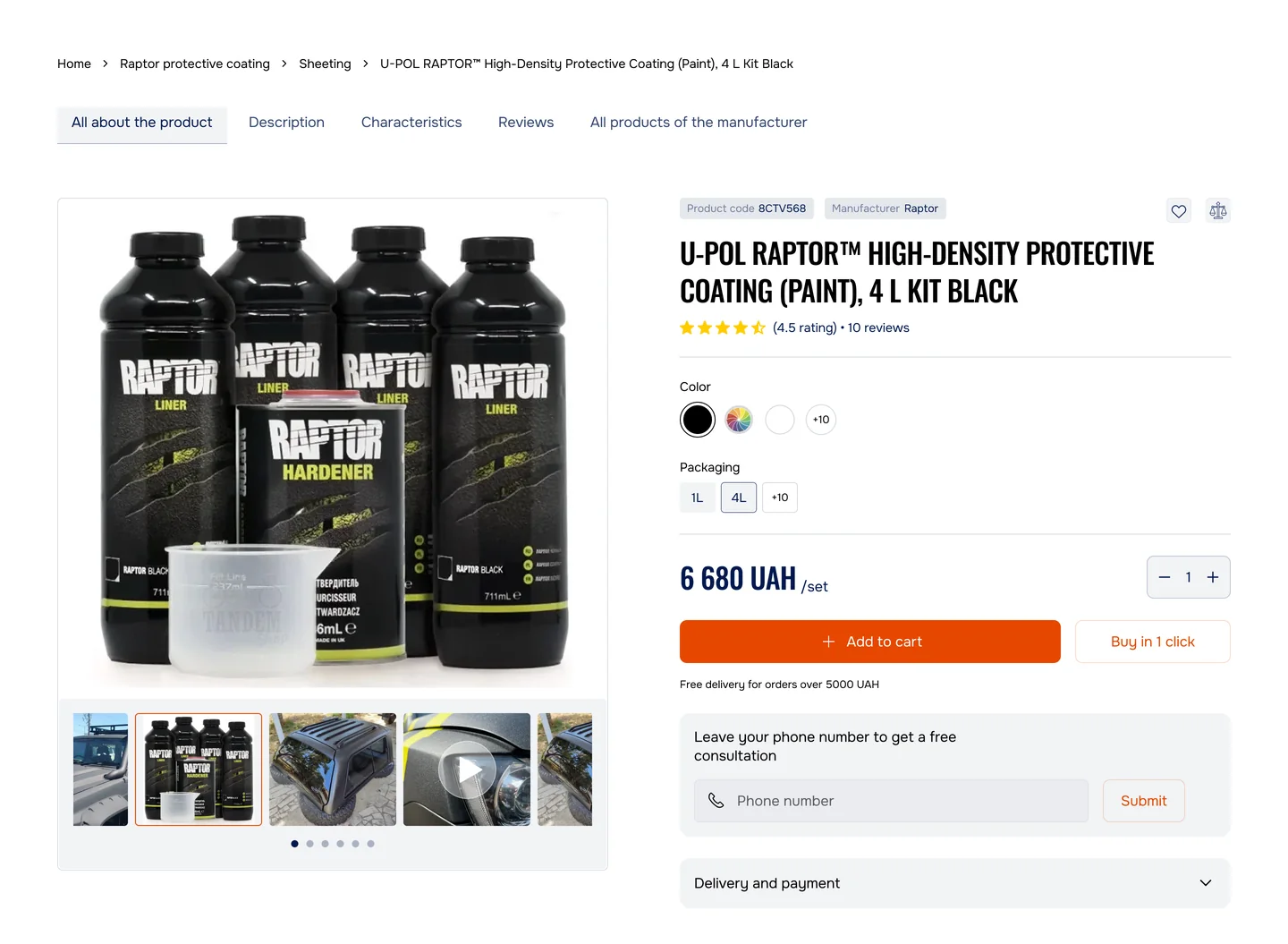
- “Free delivery for orders over 5000 UAH” right under the price
Buyers see the real price at once and don’t drop off at checkout.
3. Show the saving, if there is one


People buy the saving, not only the product.
4. Free delivery from a set amount
Say it on the page: free delivery from $100. With a $79 item in the cart, the buyer needs $21 more and adds a second product to get there. The average order grows.


5. Show what’s in the box
People need to understand exactly what they are paying for.

Element 05
The add-to-cart button
The last step before the sale.
The wrong button and people don’t buy. Five things decide whether it gets pressed.
1. Size: at least 50 × 50 px
On mobile the button should take at least 60% of the screen width, so it can be hit with a thumb.


2. A contrasting colour
Weak: a grey button on a grey background, easy to miss. Strong: a red or orange button on white, visible at once.


Test result
A grey button to an orange one
+5–10%
3. Button text
“Buy” is vague. “Add to cart” names the action. “Add to cart — $79” also shows what it costs.


4. The button follows the scroll
When the buyer scrolls down into the description, the button sticks to the bottom of the screen. Nobody should have to scroll back up to add to cart.


5. A second action for those not ready to buy
- Let them save it: an email gives you a list
- Let them ask: a chat gives you a contact


Bonus
Checklist for your product page
Go through it on one product page. Every unticked line is a place where buyers drop off.
Photos
- At least 6–8 photos
- 3+ photos of people wearing the product
- A 360° view or a slider
- Details visible: seams, material, texture
- Zoom up to 200%
Description
- The first 2 lines answer “who is it for?”
- 3–5 benefits, not features
- Materials and construction
- A size chart plus advice
- Care instructions
- 3–5 real reviews
Price and delivery
- The price stays in view while scrolling
- Delivery shown before checkout
- Delivery options with their prices
- Free delivery from a set amount, if possible
- What’s in the box
Social proof
- The rating is visible
- 3–5 top reviews with a photo or a name
- A “Verified purchase” mark
- Photos and videos from buyers
- “42 people bought this week”
- Guarantees in view
Add-to-cart button
- At least 50 × 50 px
- A colour that contrasts with the background
- Text: “Add to cart”
- Sticks while scrolling
- A second action: “Save for later” or “Ask a question”
Results
How much conversion grows
Typical results from our tests, starting from the same 2.1% conversion.
| Scenario | Before | After | Lift |
|---|---|---|---|
| 1. Photos, with buyer photos | 2.1% | +31% | |
| 2. Photos + description | 2.1% | +35% | |
| 3. Photos + description + delivery | 2.1% | +40% | |
| 4. All five elements | 2.1% | Average order $67 → $73. The lift here is revenue per month, not conversion. | +28% |
Same problem?
Send us a link to one product page. We reply with the three things we would fix first.
Send numbersOur project: TandemShop
The same five elements on a real store


Before: a gallery, a title, a price and one button, with no pack or colour choice and no delivery terms. After: colour and pack size on the card, “buy in 1 click” next to add-to-cart, and “free delivery for orders over 5000 UAH” right under the price.
I would be happy to provide additional information about the solutions developed by our team and assist you in selecting the optimal approach.
 Khrystyna Didukh Business Manager
Summary
The product page is the biggest sales engine a store has. Getting these five elements right gives you:
- More photos: people trust what they see
- A detailed description: fewer returns
- A clear price and delivery: fewer drop-offs at checkout
- Social proof: people buy what others buy
- The right button: easier to press
- cost of the work, depending on the platform
- $1,000–5,000
- conversion
- +20–40%
- return over 6–12 months
- 800–2000%








Element 04
Social proof
People don’t trust a store they don’t know.
72% of people trust ratings more than advertising. One visible negative review cuts conversion by 30%. And a 4.8 out of 5 converts better than a perfect 5.0: a flawless score looks suspicious.
1. Product rating
2. Written reviews: show the top 3
Test result
No reviews: 2.08%→ to 3–5 reviews: 2.62%
+26%
3. Photos and videos from buyers
A “Your photos” gallery of real people wearing the product, and links to buyers’ TikTok and YouTube videos. Where to get them: ask in the post-purchase email, search #yourstore on Instagram, or write in the description “Share your photo and get 5% off your next order”.
4. “N people bought this”
“42 people bought this in the last 7 days.” Others are buying it, so it’s popular, so I should buy it too.
5. Guarantees
People hesitate less when they know they can send it back.